


Lawfully Case Tracker
4.81.66K Reviews
App Specs
- Version
- 6.8.2
- Updated On
- License
- Free
- Downloads
- 1,000,000+
- Developer
- Lawfully Inc.
- Categories
- Tools
- Platform
- Android
Screenshots


 Analysis by AppCompare
If you're like me and find yourself navigating the complex maze of immigration cases, then you'll want to hear about the Lawfully Case Tracker. This app is like having a personal assistant dedicated to keeping you in the loop about your immigration case status. As someone who's experienced the nail-biting anxiety of waiting for updates, I was thrilled to give this app a whirl.
My view is that a case tracker is most useful when it helps you stay organized without tempting you to treat every status change as a prediction of what will happen next. Lawfully Case Tracker is a free tools app from Lawfully Inc. It is aimed at people following USCIS, NVC, or EOIR matters, and its practical value depends on what you need from a tracker: a convenient place to check progress, rather than a replacement for official case records or legal guidance.
Where people can get stuck
The most important early step is entering the correct receipt number. A typo, a misplaced character, or choosing the wrong case can make the app feel unhelpful even when the underlying issue is simply an entry mistake. I’d compare the number in the app with the receipt notice before drawing conclusions from a result that looks unexpected. If you track cases for more than one person or application, give each entry a clear mental label and check the receipt number again before relying on an update.
Another possible source of confusion is the difference between a case status and a forecast. A status is a report of what the case system currently shows; a prediction is an estimate based on past patterns. Those serve different purposes. I would use an estimate to set expectations loosely, not to make travel, work, or family plans that depend on a particular decision date.
Getting Started with Lawfully Case Tracker
First things first, let's talk about getting set up. Downloading the app is a breeze and available on both Android and iOS platforms. After the quick installation, you're prompted to create an account or log in. I appreciated the clean and intuitive interface, which made it easy to enter my case information. The app asks for your receipt number, and once that's plugged in, you're good to go.
Before adding a case, I’d keep the relevant receipt notice nearby and check that the number has been copied accurately. That small habit is more useful than repeatedly removing and re-adding a case when the displayed information looks wrong. It also helps if you are managing several applications: confirm which notice belongs to which case before saving the entry, so you do not mistake one family member’s progress for another’s.
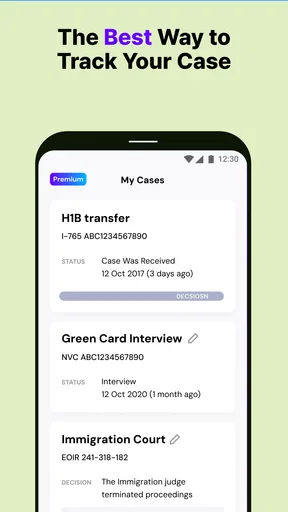
What caught my attention right off the bat was the app's ability to track multiple cases simultaneously. If you're someone juggling different applications, this feature is a lifesaver. You can effortlessly add another case number, and the app will keep tabs on all of them. It’s like having a digital filing cabinet right in your pocket.
Worth Reading Before You Choose

EA SPORTS FC Mobile 26 Is a Bigger Football Game, but It Takes Time

Flipboard Shows What News Apps Must Do Beyond the Feed

Switching to Android Auto Means Rethinking Your Driving Routine

Google Calendar Makes a Crowded Week Easier to Manage

Ludo King Makes the Most of the Minutes Between Plans

Baby Panda World Brings Quick Play to Modern Phones, but Its Game Library Feels Busy
That setup can be especially handy for a household where applications move on separate timelines. For example, I might check a family member’s case in the morning and my own later in the day; keeping both in one place saves the effort of starting each check from scratch. The trade-off is that a single view can become confusing if you do not remember which receipt number belongs to each person. I’d keep a private note identifying each case without adding unnecessary personal details to the app.
Features that Make a Difference
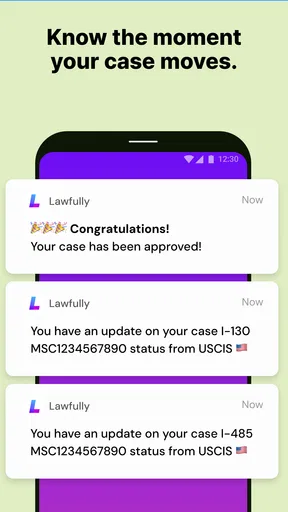
Let’s dive into the meat of what makes Lawfully Case Tracker stand out. The app provides real-time case status updates, which is incredibly handy. No more logging into multiple websites or attempting to decipher government jargon. The notifications are prompt, ensuring you’re always up to date.
I would still treat a notification as a nudge to review the case, not as a complete explanation of what a change means. If a status seems consequential or unclear, compare it with the official case information and read any notice you receive from the relevant agency. This simple two-step workflow—use the app to notice a change, then verify what it means through official correspondence—helps prevent a short status line from becoming the basis for a big decision.
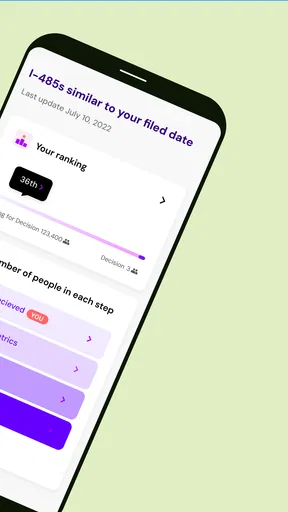
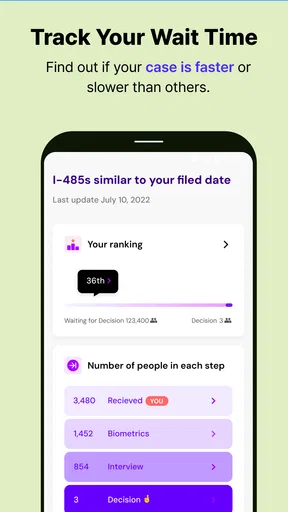
One feature I found particularly useful is the prediction tool. It uses historical data to predict the potential timeline of your case. While it's not always 100% accurate, it gives a decent estimate, which can be quite reassuring during the waiting period.
There is a real trade-off here: an estimate can help you think about the process, but it can also make an uncertain wait feel more precise than it is. I’d check it occasionally rather than refreshing it whenever anxiety rises. If the prediction changes, that is not by itself proof that anything has gone wrong with your case. For people who prefer only confirmed updates and find timeline estimates stressful, the prediction feature may be less helpful than simply checking official notices when they arrive.
The app also includes a community feature where you can connect with others in similar situations. It felt a bit like a support group, allowing users to share experiences and advice. It’s comforting to know you’re not alone in the process, and sometimes, hearing from others can provide a much-needed morale boost.
I’d use community conversations as peer perspective, not as a source of case-specific legal advice. Two people can have similar-looking cases and still face different circumstances, so another user’s timeline or outcome is not a reliable forecast for yours. The feature is best for feeling less isolated and learning what questions people commonly ask; for decisions with legal consequences, a qualified professional is a better place to turn.
Setup checks and a calmer routine
A useful routine is to check the receipt number when first adding a case, then let the tracker serve as a convenient reference rather than making constant manual checks. If you receive a notification, open the relevant case and note what actually changed. Keep official notices and important documents in their proper place as well; a tracker can make monitoring easier, but it should not become your only record of an immigration matter.
If an entry appears stale or a notification does not match what you expect, first check that you are looking at the correct case and that the receipt number was entered accurately. Then compare the status against the official source. This order avoids a common dead end: assuming the app is broken before checking whether the case or reference number is the one you intended to follow.
User Experience and Interface
Speaking of the user experience, I was impressed by how user-friendly the app is. The design is sleek and straightforward, with a focus on functionality. Navigating through the app’s features is seamless, and everything is where you'd expect it to be.
Its clearest advantage over manually checking several case pages is convenience: the app brings case tracking into a single mobile workflow, including when you follow more than one application. The official route remains important when you need to verify a status or act on formal instructions. In practice, I see the two approaches as complementary rather than competing: use Lawfully for routine monitoring and organization, then use official information for confirmation and next steps.
For everyday use, I would avoid turning the app into a constant refresh habit. A practical scenario might be checking once during a normal break, noticing a status change, and then reviewing the corresponding official information at a time when you can read it carefully. That keeps the tracker useful without letting every quiet day feel like a new development.
I also appreciated the app’s commitment to security. Given the sensitive nature of the information, it's reassuring to know that the app employs robust security measures. Your data is encrypted and kept private, which should ease any concerns you might have about privacy.
Even with that reassurance, I’d be thoughtful about what information I share in community discussions and would avoid posting identifying case details. Immigration records are personal, and a public conversation is not the right place for receipt numbers or private documents. Anyone especially cautious about entering case information into a third-party tracker may prefer to rely on official channels alone.
When the app is not the cause
A delay or lack of movement can be frustrating, but it does not automatically mean the tracker has failed. The app reports information for monitoring; it cannot make an agency process a case faster or explain every reason for a pause. If the official case information and the app do not seem to agree, check the official source and any notice you have received before deciding which status to rely on.
That distinction matters most when a deadline, travel plan, or other serious decision is involved. I would not use a prediction or a community member’s experience as confirmation that a specific action is safe. The app is not a substitute for a lawyer, and a legal professional or the relevant agency is the more appropriate source when you need an authoritative answer.
Lawfully Case Tracker has a 4.8 average from around 58,000 ratings, and it has been installed over a million times. That level of use suggests it has found an audience among people who want a mobile way to follow immigration cases, but popularity does not change the basic limitation: case monitoring is not the same as case representation. It is free to install, rated for Everyone, and offers in-app purchases ranging from $4.99 to $184.99 per item, so I’d review any purchase details in the app and decide whether the included value fits your needs before paying.
Final Thoughts
So, is the Lawfully Case Tracker the right app for you? If you’re dealing with the complexities of immigration and want a tool to help manage the process, I’d say give it a shot. The convenience of having all your case information in one place, combined with timely updates, makes it a valuable resource.
I think it suits people who check more than one USCIS, NVC, or EOIR case, want a central mobile reference, and can keep estimates in perspective. It is less suitable for someone who needs legal interpretation, wants an official record as the sole source of truth, or finds predictions and other people’s timelines more stressful than useful. The current version is 6.2.5, and the minimum OS is 7.0; those details are worth checking against your device before installing.
While it's not a substitute for professional legal advice, it certainly complements the process by keeping you informed and engaged. Plus, the community aspect adds a layer of support that’s often needed during such a stressful journey.
In a world where every update can make a difference, having an app like this in your arsenal is a game-changer. Download it, try it out, and see how it can make the immigration process just a little bit easier to navigate.
Pros
- User-friendly interface for easy navigation.
- Real-time updates on case status.
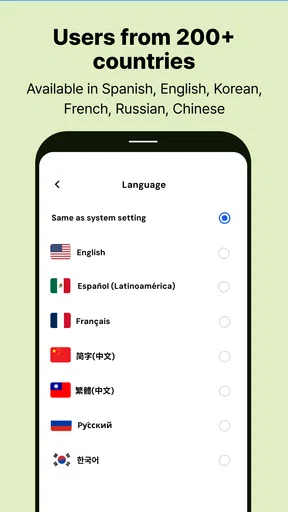
- Supports multiple languages for accessibility.
- Customizable notifications for case changes.
- Secure login for enhanced privacy.
Cons
- Limited to specific immigration cases.
- Requires internet connection to update.
- Some features locked behind paywall.
- Occasional delays in status updates.
- No offline mode for case viewing.
FAQs for Lawfully Case Tracker
What is Lawfully Case Tracker and how does it work?
Lawfully Case Tracker is an app designed to help users manage and track their immigration cases efficiently. It provides real-time updates on case status, personalized predictions, and alerts for changes. Users can input their case details, and the app uses historical data and AI algorithms to offer insights on processing times and outcomes.
Is Lawfully Case Tracker free to use?
Lawfully Case Tracker offers both free and premium versions. The free version includes basic features such as case tracking and status updates. For more advanced features like personalized predictions and detailed processing analysis, users can opt for a subscription plan. Pricing details are available within the app and on their website.
How accurate are the predictions provided by Lawfully Case Tracker?
The predictions offered by Lawfully Case Tracker are based on historical data and advanced AI algorithms. While the app strives for accuracy, predictions are estimates and can vary based on individual case circumstances and changes in immigration policies. Users should use these insights as guidance rather than guarantees.
Is my personal information safe with Lawfully Case Tracker?
Lawfully Case Tracker prioritizes user privacy and employs robust security measures to protect personal data. The app uses encryption protocols to safeguard information and complies with data protection regulations. Users can review the privacy policy within the app for detailed information on data handling practices.
Can Lawfully Case Tracker handle multiple cases simultaneously?
Yes, Lawfully Case Tracker allows users to manage multiple cases at once. This feature is particularly useful for families or individuals with multiple immigration processes. Users can add different cases within the app and receive updates and predictions for each one individually, streamlining the case management process.


